Most people think compliance is a checklist. It's not. It's project management with a recurring audit, and in enterprise, that project has no clean edges.
A healthcare company might be running HIPAA, DORA, and PCI simultaneously—across payment infrastructure, gift card systems, and pharmacy partnerships. Different frameworks, different scopes, different owners, same audit window. The complexity doesn't add. It multiplies.
Drata needed to treat it like a system.
The Primer: What is a control?
A control is a policy, process, or safeguard an organization puts in place to reduce risk. Think of it as the commitment layer—not the evidence that you did something, but the standing agreement that you do it.
Multi-factor authentication is a control. So is employee security training. Access reviews, vendor risk assessments, encryption at rest—all controls.
In a small org, a control is contained: one team owns it, one process implements it, one set of evidence proves it. In enterprise, that simplicity collapses. MFA means something different for each application in your stack. The team implementing it on your identity provider isn't the same team implementing it on your CRM, your cloud infrastructure, or your internal tooling. Same goal. Different owners, different procedures, different evidence—and often different frameworks requiring it.
This distinction—between the goal a control is trying to achieve and the implementation of that goal in practice—is the gap this project set out to close.
Two concepts anchored everything that followed:
Control objective
The high-level goal the organization is trying to achieve. "We ensure only authorized users can access sensitive systems." Stable, framework-agnostic, owned at the org level.
Control implementation
The specific activities, owners, and evidence tied to a particular application or scope area. Varies by system, by team, by geography. Multiple implementations can fulfill a single objective—and in enterprise, they almost always do.
Before this project, Drata didn't have a structural way to express that relationship. The two lived as separate concepts in users' heads, not in the product.
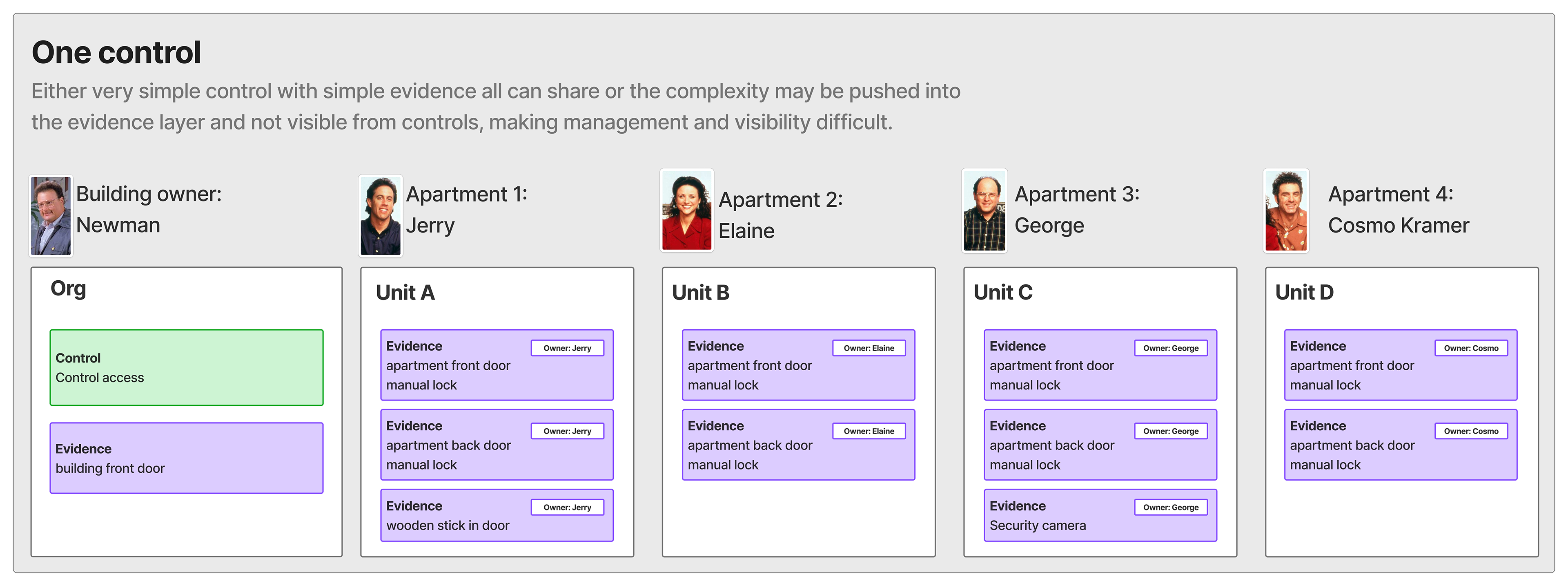
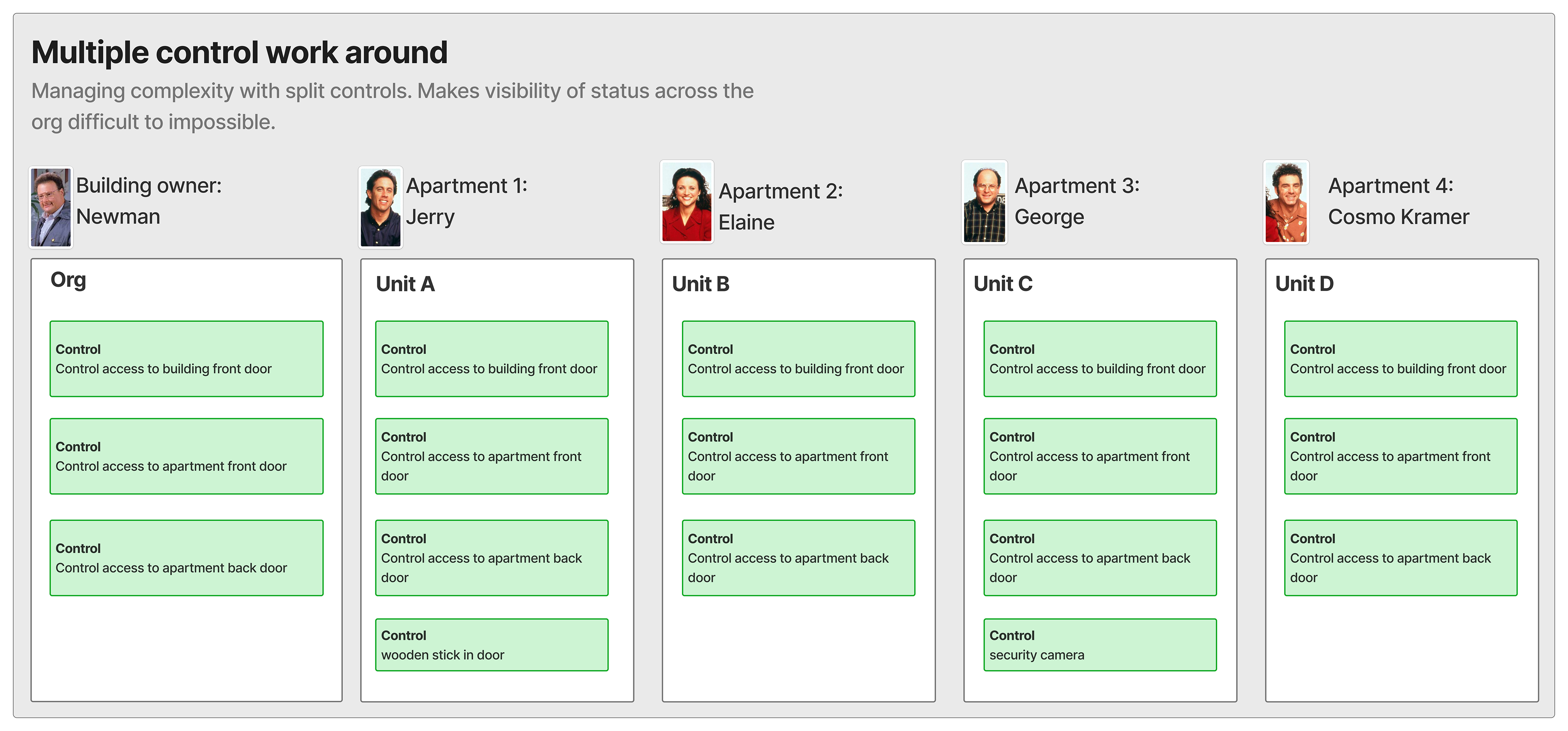
To make this tangible before we get into enterprise complexity: imagine an apartment building. Four units owned by Jerry, Elaine, George and Cosmo. Newman owns the building.
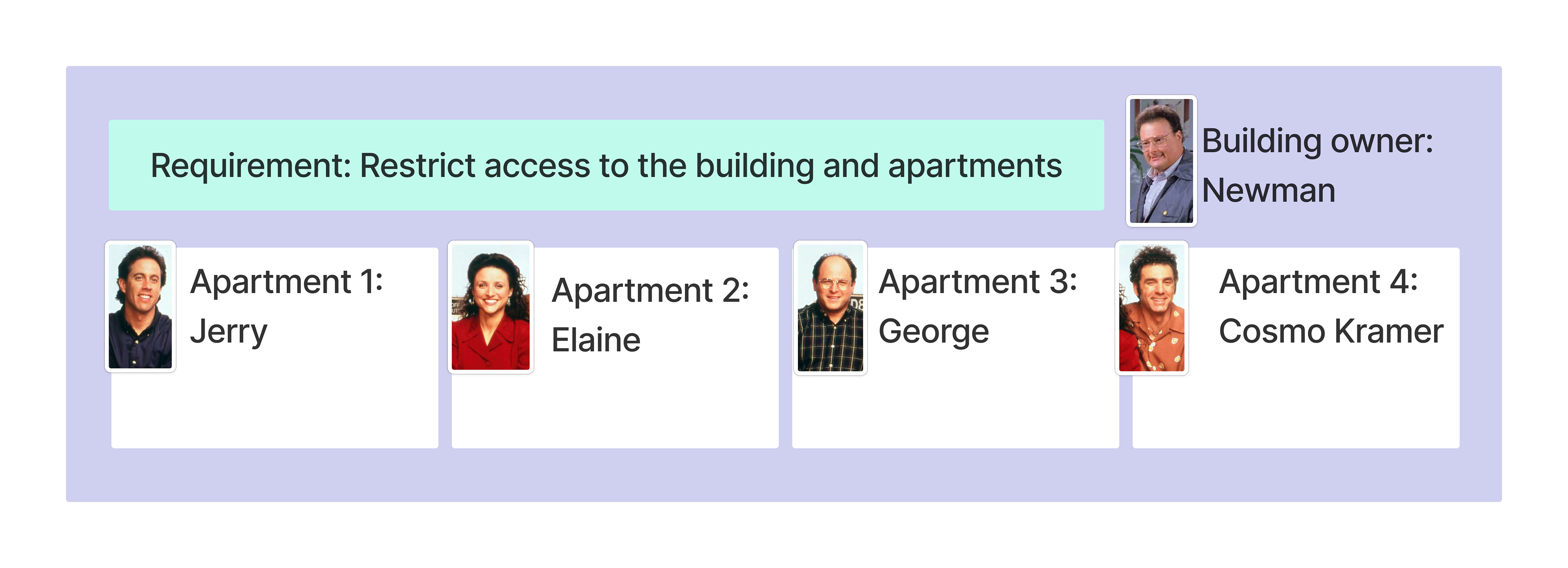
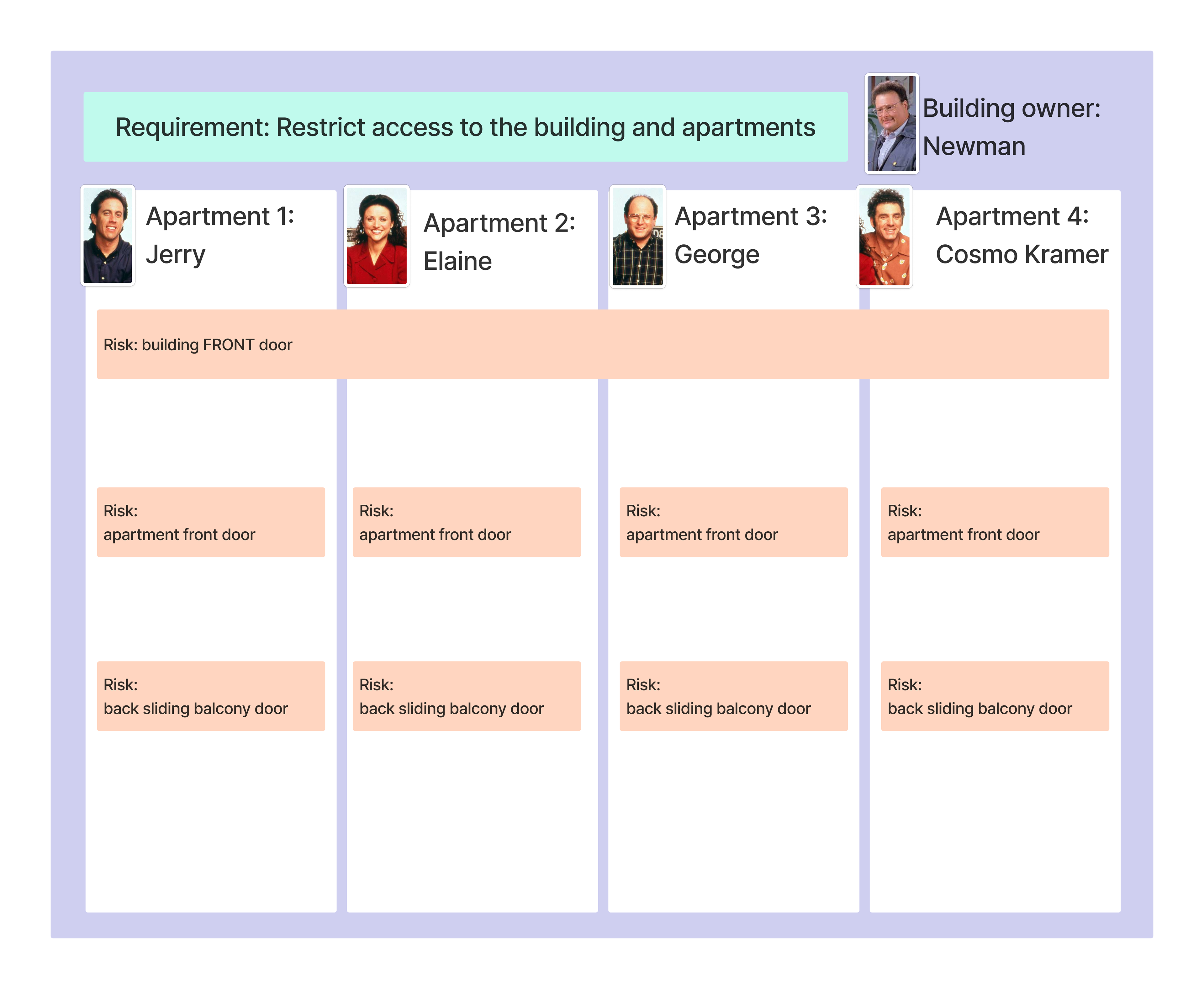
They all share a compliance requirement: restrict access to the building and apartments. Newman has a building-level risk—the front door—and he controls it with an auto-lock and buzzer system. His evidence covers everyone. That's a shared control: one owner, one implementation, one set of proof that satisfies the requirement for the whole building.
Each tenant has their own risks though. Their apartment front door is one—they all have a manual lock, same control, but each is responsible for operating it. That's inherited: the control is defined once, applied to all, each owner manages their own scope. Their sliding balcony door is another risk, also addressed with a manual lock—but here the implementations start to diverge. Jerry keeps a wooden stick in the door jam. George installed a security camera. Those are unique additions each owner manages independently.
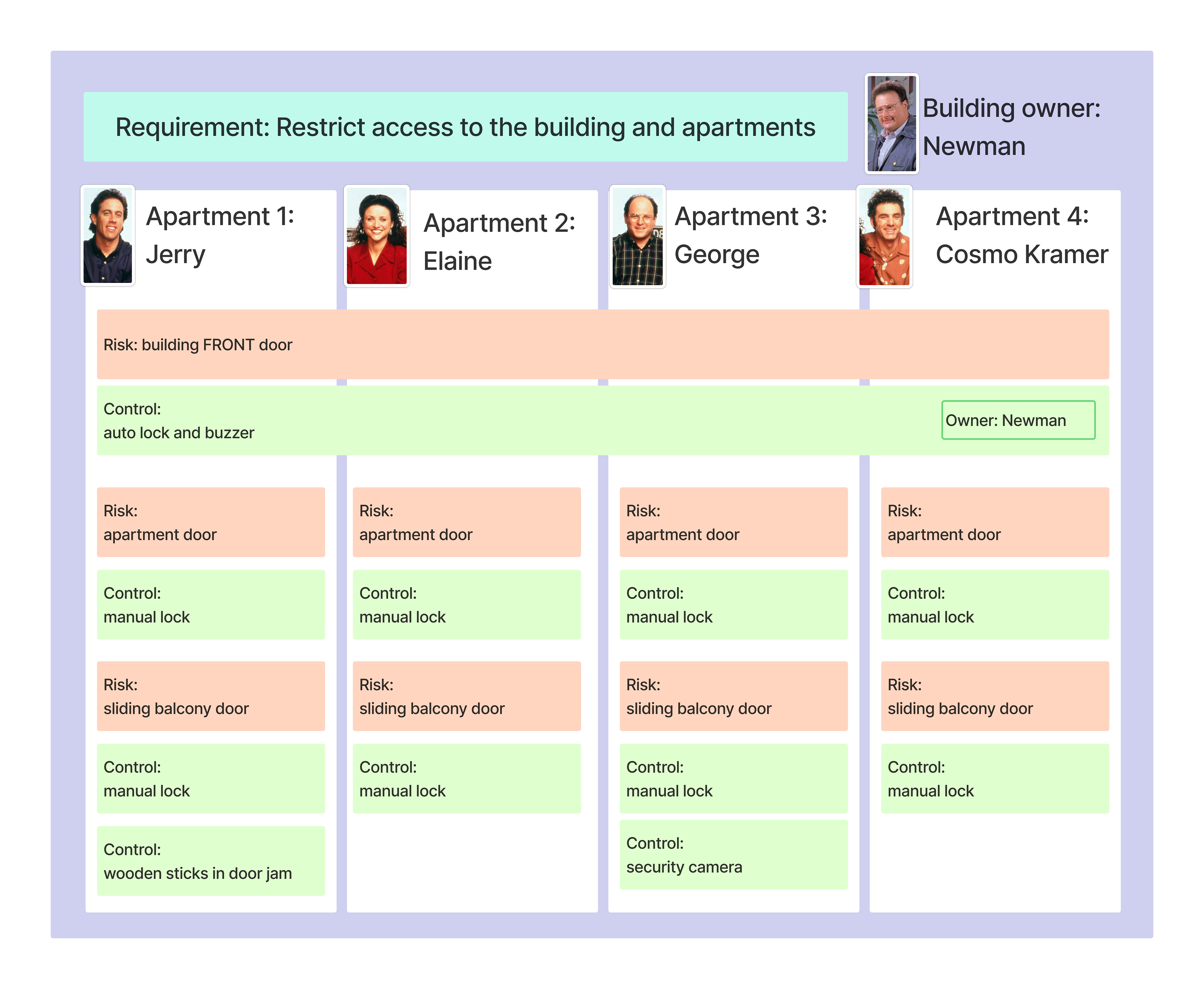
Same building. Same overarching requirement. Three different patterns of ownership and evidence—all valid, all necessary. The model has to hold all of them.
Customer Research: How Enterprise Teams Actually Work
I met directly with 12 enterprise customers—most twice. An early discovery round to understand how they were working, then a second round to bring concepts back and pressure-test them. Beyond those 12, 50+ additional customers and prospects had surfaced the same friction through sales conversations, support, and ongoing feedback. Enterprise customers weren't managing controls as discrete tasks. They were managing programs—interconnected, multi-team, multi-system efforts that needed to be visible and auditable across the org.
Three patterns showed up across all of it.
Mixed frameworks, shared controls
Customers running multiple frameworks weren't managing independent checklists. Many controls overlapped—the same commitment was required by HIPAA, DORA, and PCI, just worded differently. Teams needed to fulfill an obligation once and map it across frameworks, not rebuild it for each.
Controls without a single owner
Many controls aren't owned by one person or one team. The goal is set at the org level. The implementation is distributed—each system or product area has its own owner, its own evidence, its own operational cadence. Without a structure to hold that, ownership becomes ambiguous and accountability disappears into the org chart.
Workarounds that created more problems
Before hierarchy existed, customers were managing this two ways—both imperfect. Some duplicated controls to assign the same goal to multiple teams. Duplication created noise: reporting became meaningless when 300 listed controls actually represented 50 underlying commitments. Ownership fragmented. Evidence drifted. Others stacked evidence library objects onto a single control to represent multiple owners. That didn't match how compliance teams actually think—the evidence owner isn't always the control operator—so it solved the data problem without solving the mental model.
Both workarounds pointed to the same missing thing: a structural parent-child relationship between a control's objective and its implementations.
Synthesizing across all of it—12 direct customer conversations, 50+ data points from sales and support, and sessions with internal partners—three functional requirements came into focus:
Inherited controls
A parent control whose data—definition, owners, policies, evidence—cascades to child workspaces. Sometimes that inheritance is enforced and workspace owners can't override it. Sometimes it's a starting point they can customize. Either way, the parent is the authoritative source and the children derive from it.
Objective and operational controls
A parent that defines the "what"—the compliance commitment—and children that define the "how" in specific contexts. The parent is complete on its own. The children are additive, representing genuinely different implementations across systems, teams, or geographies.
Shared controls
A single control applied across multiple workspaces where all workspaces benefit from the same evidence. No child controls. No inheritance hierarchy. Just one control, one set of proof, auditable everywhere it applies.
First-Pass Concepts
This project didn't exist in isolation. While I was in deep discovery on controls hierarchy with a PM and 12 enterprise customers, two other designers and their PMs were working through similar signals on Vendors and Risk. Hierarchy wasn't a controls problem—it was a platform-level pattern emerging across multiple objects simultaneously. That cross-team conversation ran in parallel throughout early concepts, and it mattered: decisions we made on controls shaped how hierarchy would work everywhere else.
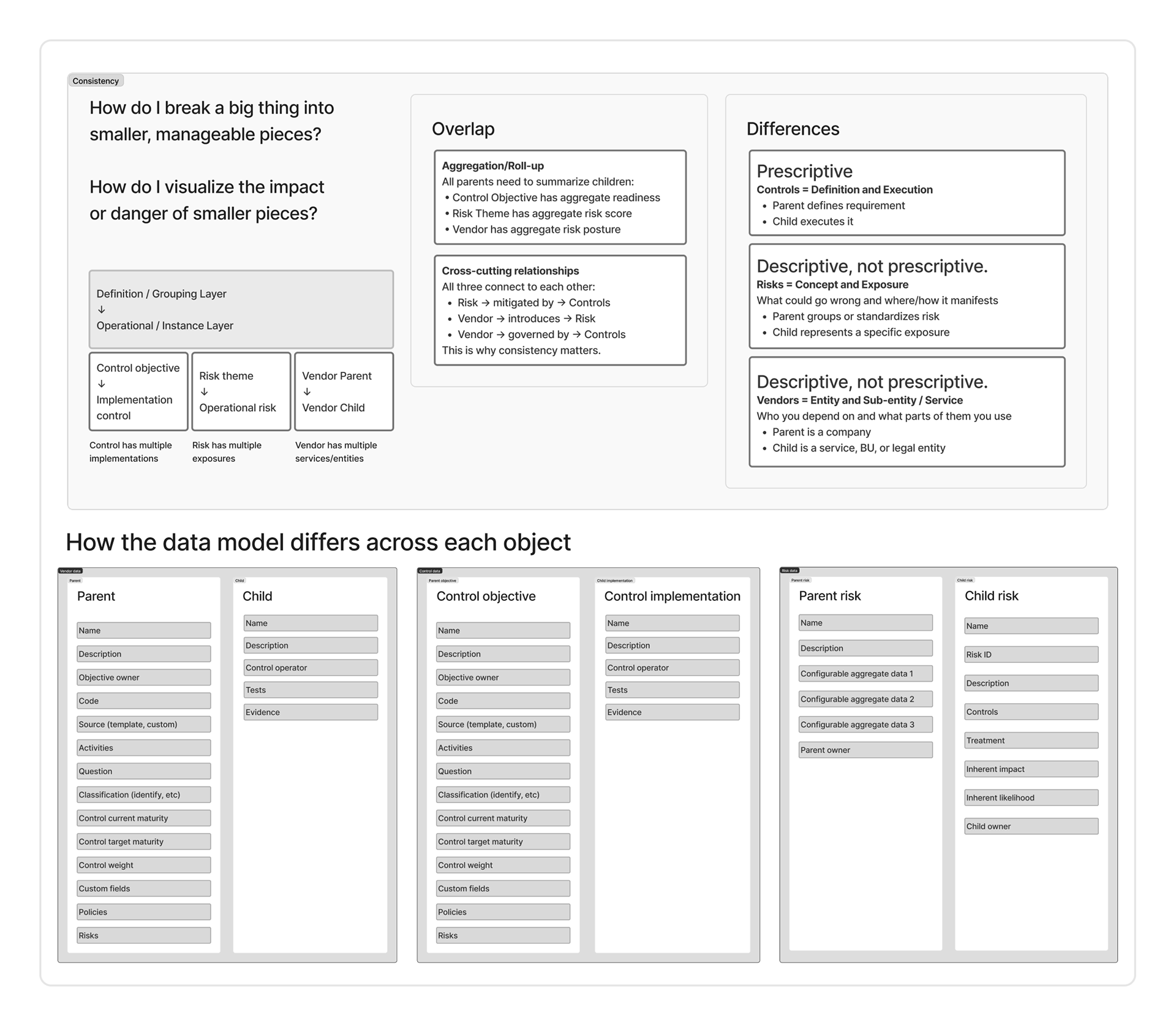
The three objects shared the same structure—a definition layer and an instance layer—but the meaning of that relationship was completely different for each. Controls are prescriptive: the parent defines the requirement, the child executes it. Risks are descriptive: the parent groups or standardizes, the child represents a specific exposure. Vendors are also descriptive, but differently—the parent is the company, the child is the service, BU, or legal entity. Same pattern, three different mental models. That distinction mattered for how each object's hierarchy would need to be designed and communicated on the front end—shared system logic didn't mean shared UI.
Enterprise customers were also asking for something adjacent but distinct—a central library of controls that could be defined once and applied across product areas and workspaces. That wasn't the same as parent-child hierarchy, but it was tangled up with it. A centrally owned control objective that pushed down to workspace-level implementations was both a hierarchy question and a library question.
At the surface, the UI concept was clean.
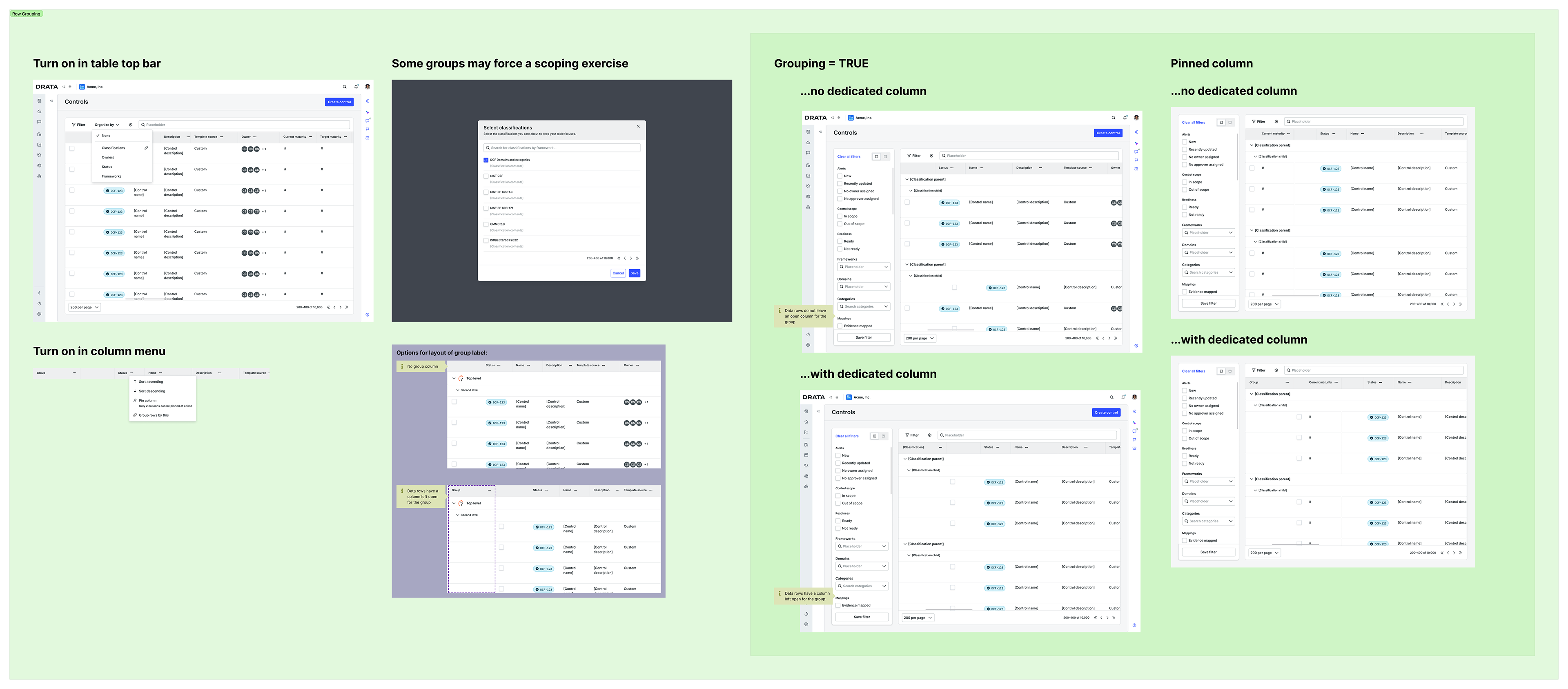
The list view already had a grouping pattern being built with design systems engineers—and it's worth being specific about why. Row grouping wasn't a feature invented for hierarchy. It was a foundational pattern I'd identified early in this project and in a parallel workstream: control maturity and weight.
Enterprise compliance programs don't stop at passing an audit. The more mature teams are actively managing the quality of their controls over time—tracking where each control sits today and working toward a more mature implementation. A manual door lock is low maturity, high weight (it's critical to the program but fragile). An automated lock with retina scanning, cameras, and a digital access log is high maturity. Getting from one to the other is a program goal, not a one-time task.
To manage that, customers needed to be able to visually group controls by data in the row—maturity level, classification, weight—so they could see the full picture of their program health and prioritize work. The same grouping mechanism that surfaced maturity clusters also, it turned out, made parent-child hierarchy legible in the list view.
Enabling it for controls hierarchy meant a parent objective could anchor a group of child implementations in the table—toggled on from the column menu or the table toolbar, with variations on whether the group label got a dedicated column or lived inline. For a reader scanning the controls list, the hierarchy would be legible without a new paradigm.
The detail page work was a natural extension: a control objective page that surfaced its implementations as managed children, a panel to configure each implementation's details, and updates to any object in the product that referenced a control—so that wherever a control appeared (a risk, a vendor, a framework requirement), both the parent and its relevant child were represented.
One of Drata's product principles was "do it for me"—reduce friction wherever possible, especially for complex configuration. Applied here, that meant not making admins manually wire up inheritance rules for every control. Instead, I developed a preset system: three default modes of inheritance, selectable at the global level and overridable per control by an admin

Rollup is for teams operating independently under the same objective. Each implementation manages its own owner, evidence, policies, and approvals—the parent just aggregates readiness.
Shared definition is for teams following a common standard but collecting their own evidence. Description and activities inherit from the objective; everything operational is customizable at the implementation level.
Fully guided is for centrally owned controls where a single team defines the requirement and others just contribute proof. Owner, approver, policies, and most mappings are standardized from the top; implementations only manage their own evidence and tests.
A fourth option—Custom—was reserved for edge cases where none of the presets fit.
The presets weren't just a UX convenience. They encoded a real range of enterprise org patterns into the product, and they surfaced a live debate: should hierarchy be opt-in per control, or should all controls in all orgs be hierarchical by default? That tension—between flexibility and a cleaner system model—was still unresolved as we moved further into discovery.
Where it got complicated was permissions.

Not every person who touches a control owns all of it. A control objective might be centrally managed by an IT team—or, if it's a policy control, by HR. That objective then gets applied to workspaces organized around products, regions, or business units. The workspace owners responsible for implementing the control in their scope can't—and shouldn't—edit the central objective. They own the implementation. Someone else owns the goal.
Working through the data model with customers and Drata's internal GRC professionals meant mapping every data field to its owner: what was editable at the objective level, what was editable at the implementation level, and what was read-only for workspace owners who inherited the control from above.
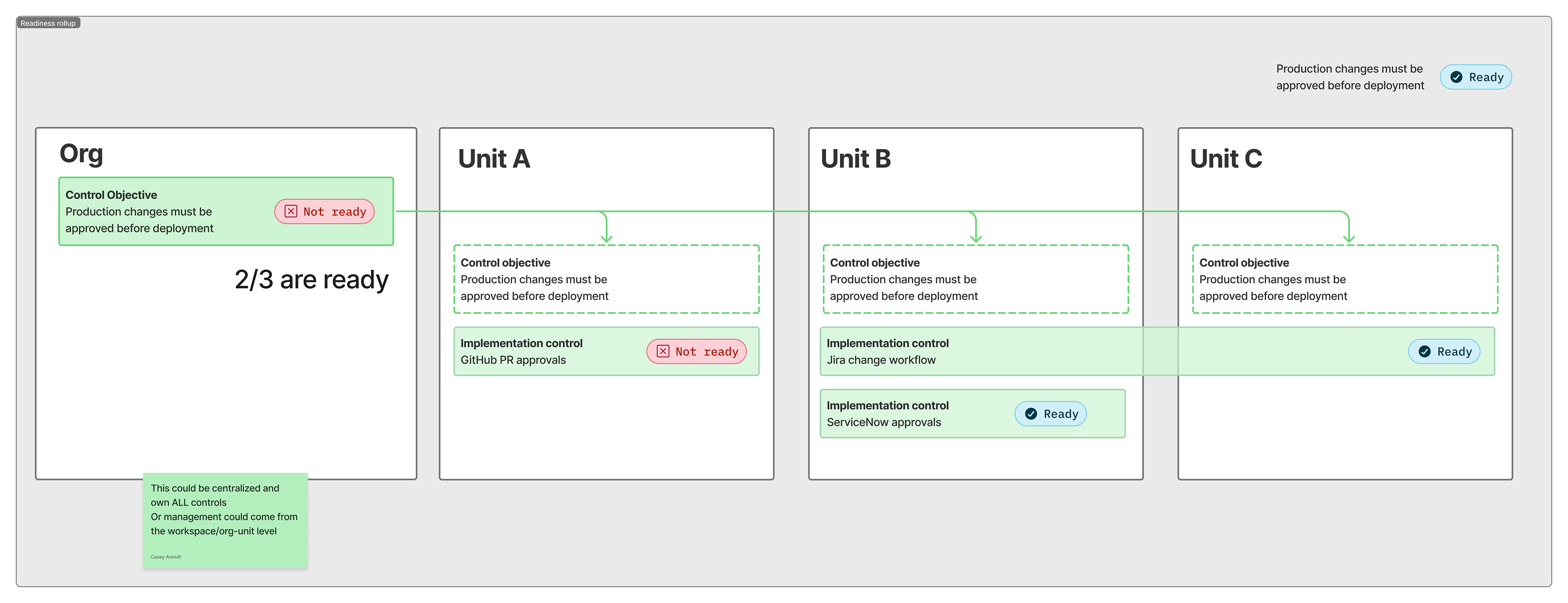
The cross-workspace readiness rollup was the payoff. From the objective level, a compliance team could see that 2 of 3 business units were ready—and click into each implementation to understand why the third wasn't. That visibility was exactly what enterprise customers said they couldn't get with duplicated controls or stacked evidence objects.
The open questions at this stage weren't about the UI. They were about the model. Where did policies map—to the objective, the implementation, or both? How did approval and workflow triggers propagate through the hierarchy? Those were still live as we moved into the next phase of discovery.
The Pivot: What GRC Professionals Actually Mean by "Control"
The original model had a clean logic to it: take everything a control currently was, and split it. Definition, framework mappings, classification on one side—the objective. Evidence, tests, owners, operational activity on the other—the implementation. Every control would have both. The hierarchy would be universal.
The problem surfaced in desk research with Drata's internal GRC function, and it wasn't subtle. For a GRC professional, a control is already a complete thing. It has its definition. It has its evidence and tests. It has its framework mappings. That's the control—not a half of one.
Implementations exist when you need them, not by default.
We already knew three functional requirements were in play—inherited controls, objective and operational controls, and shared controls. The GRC conversation made clear that the original model could only handle one of them. Forcing every control into an objective-plus-implementation split didn't match how any of the three patterns actually worked in practice.
The apartment analogy makes this concrete. "Restrict access to the building" could be configured three ways by three different organizations—all valid, all addressing the same compliance requirement. In one org, the building front door control is complete on its own and Newman's auto-lock evidence covers everyone. In another, each apartment owner inherits the access control definition but manages their own implementation—Jerry's wooden stick, George's security camera, all captured as variations under the same parent. In a third, a single shared control with one set of evidence applies to the whole building without any implementation structure at all.
The original model could handle one of those. The right model had to handle all three.

What changed structurally: implementations became optional and additive, not a required layer of every control. A control could be complete on its own—with evidence, tests, policies, and framework mappings at the objective level—and workspaces could benefit from that evidence without any child controls. Or a parent could have implementations when there were genuinely unique operational differences by scope. The choice belonged to the organization, configurable globally and adjustable per control by an admin.
This wasn't a correction. It's what discovery is supposed to do—surface the gap between your mental model and your users'. The internal GRC conversation happened to be the moment it landed clearly enough to act on.
Designing for AI-Assisted Compliance
The hierarchy model wasn't just a UX solution to a complex data problem. It was the architectural precondition for AI-assisted compliance to work at all.
Without a clear separation between what a control requires and how it's implemented across different environments, systems, and teams, there's nothing for an AI to reason about. A flat list of 300 controls—many of them duplicated workarounds—is noise. A structured hierarchy of 50 objectives with named implementations, field-level ownership, and defined inheritance rules is a model the system can read, evaluate, and act on.
The user stories written throughout this project made that explicit. The AI layer wasn't a feature bolted on at the end. It was designed alongside the hierarchy model as a set of specific jobs the system needed to do—organized into three categories.
Without a clear separation between what a control requires and how it's implemented across different environments, systems, and teams, there's nothing for an AI to reason about. A flat list of 300 controls—many of them duplicated workarounds—is noise. A structured hierarchy of 50 objectives with named implementations, field-level ownership, and defined inheritance rules is a model the system can read, evaluate, and act on.
The user stories written throughout this project made that explicit. The AI layer wasn't a feature bolted on at the end. It was designed alongside the hierarchy model as a set of specific jobs the system needed to do—organized into three categories.
Always-on signals
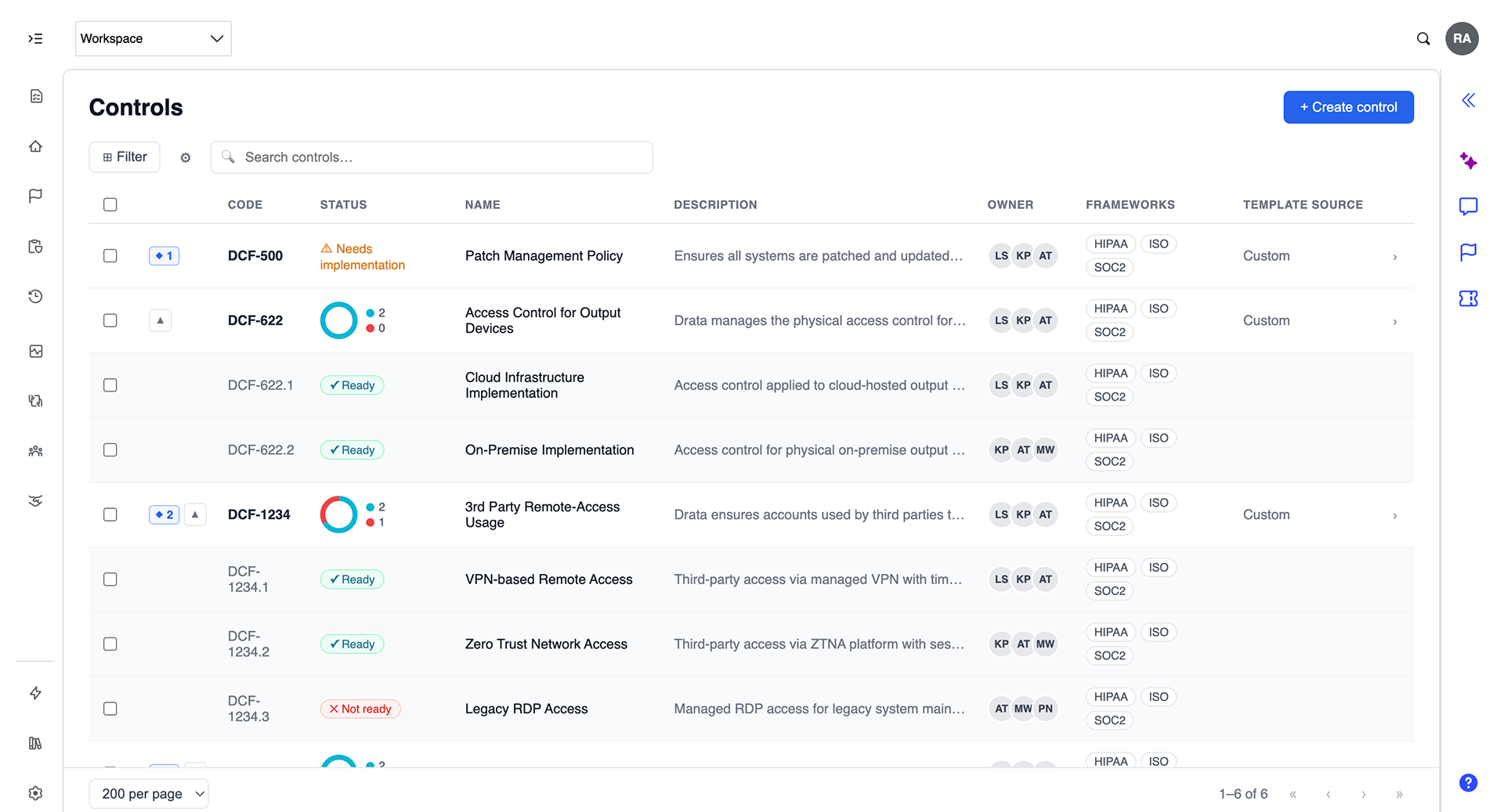
The prototype surfaced several ambient patterns that required no user trigger: readiness aggregating automatically across implementations into a donut chart and four summary cards (evidence, monitoring, policies, approvals); the diamond badge (◆) flagging how many items need attention per objective; and automated monitoring tests running against live integrations and surfacing pass/fail states directly on the control. These patterns only work because each implementation has a discrete, evaluable state—the hierarchy makes the health score meaningful.
Setup and migration assistance. Getting a compliance program into a hierarchical structure is itself a non-trivial problem, especially for organizations that have been managing controls manually for years. The user stories defined several specific AI jobs here: recognize when existing controls and evidence suggest hierarchy should exist; identify controls that share the same framework requirement mappings as candidates for a parent-sub structure; surface consolidation opportunities when multiple controls reference the same policies, evidence, or tests; and at import time, flag a new control as a potential implementation of something that already exists rather than letting it become a duplicate.
This flow was designed and documented in discovery—the system detects DCF-456 (LATAM) and DCF-789 (EMEA) as controls created as workarounds for the same objective as DCF-622, proposes a merge into a parent with children, and proactively surfaces an APAC variant as a next step. It's not just cleaning up the past. It's anticipating what the program needs next.
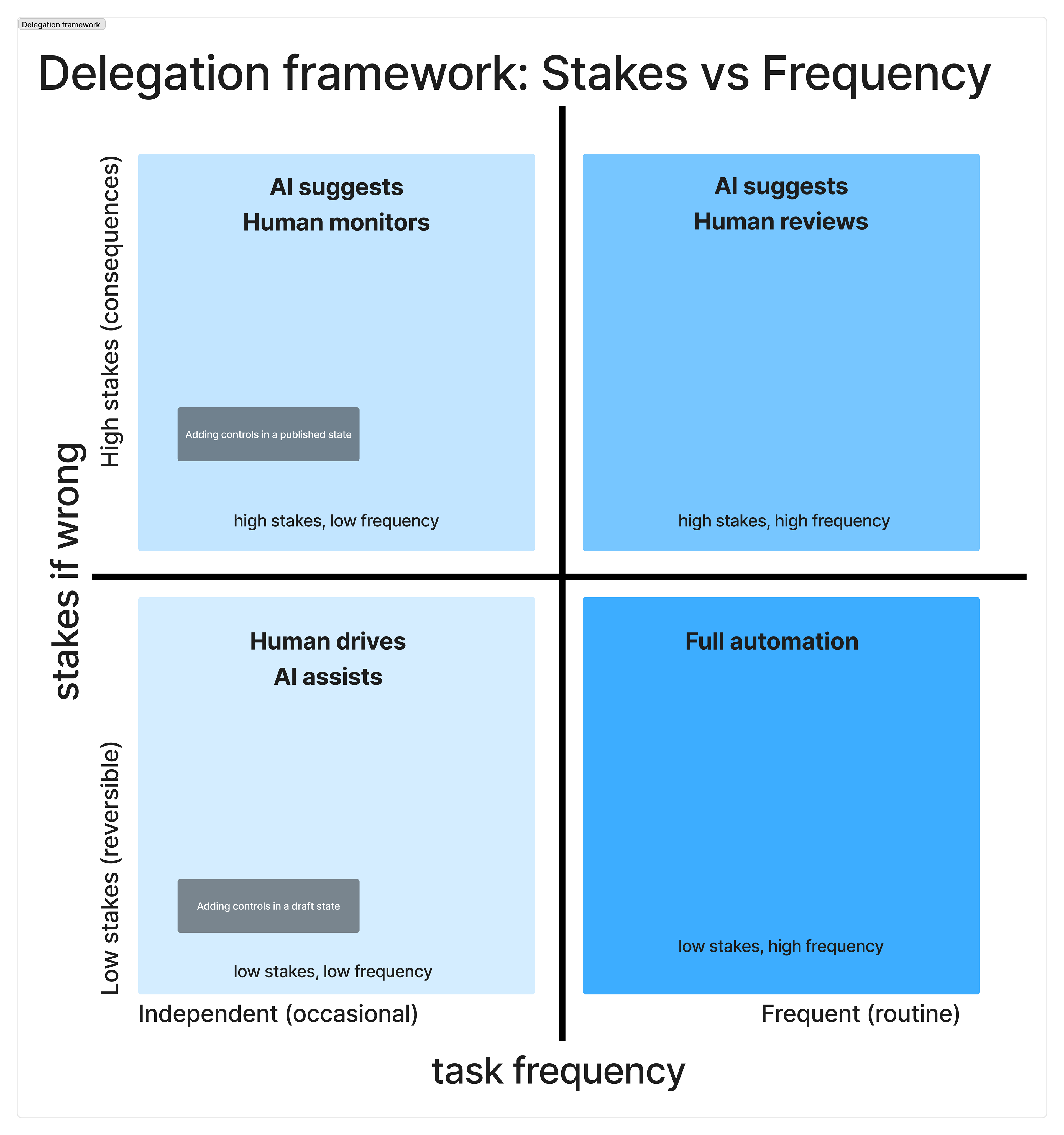
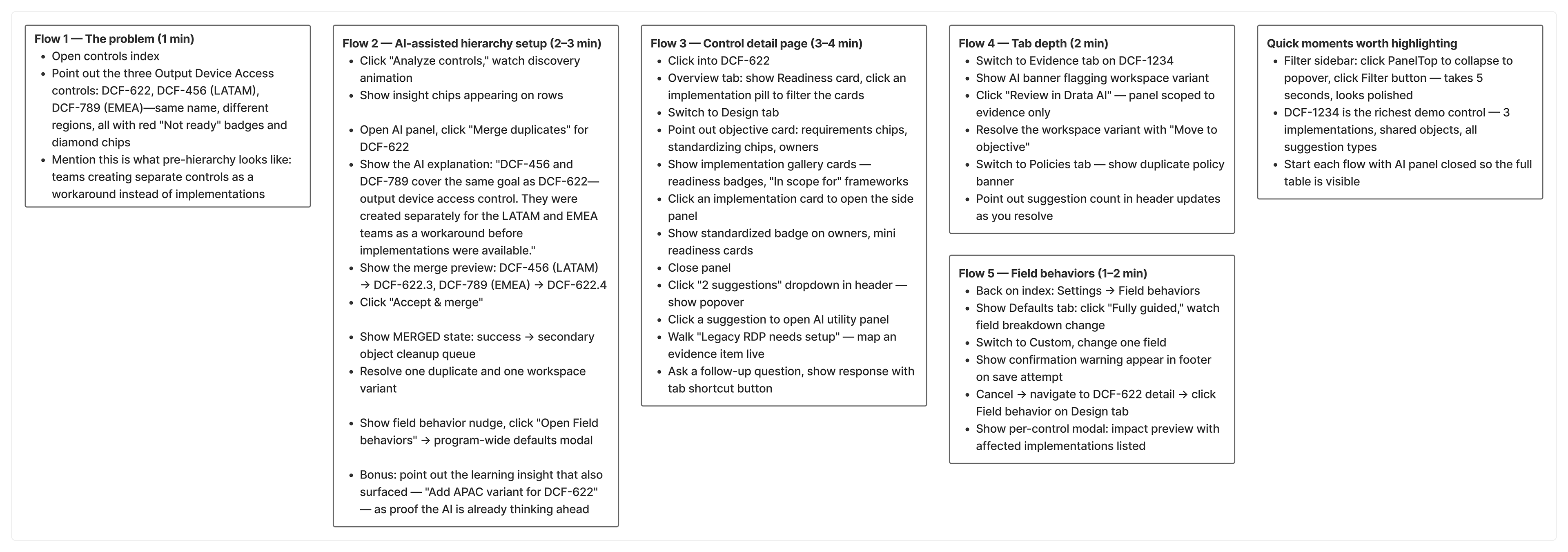
Library maintenance and drift detection. Controls sourced from Drata's library stay connected to their template. When Drata updates a template—because a framework changed or best practice shifted—the system flags the drift and surfaces a compare action. Applying the update isn't a blunt override: the system respects field behavior settings, automatically updating standardized fields and flagging customizable ones for review. The compliance manager doesn't lose intentional deviations. The system knows which fields it owns and which belong to the user.
What Comes Next (and What We Already Knew Would)
Solving hierarchy at the control level immediately surfaced the next layer of complexity—and we'd already seen it coming.
Every object mapped to a control inherits the hierarchy problem. Evidence, monitoring tests, policies, approvals: in a world where one control objective has four implementations across four business units, each of those mapped objects also needs to be organized by implementation. Without that, the evidence tab on a control becomes a flat list of 60 items with no way to understand which implementation they belong to or who's responsible for them.
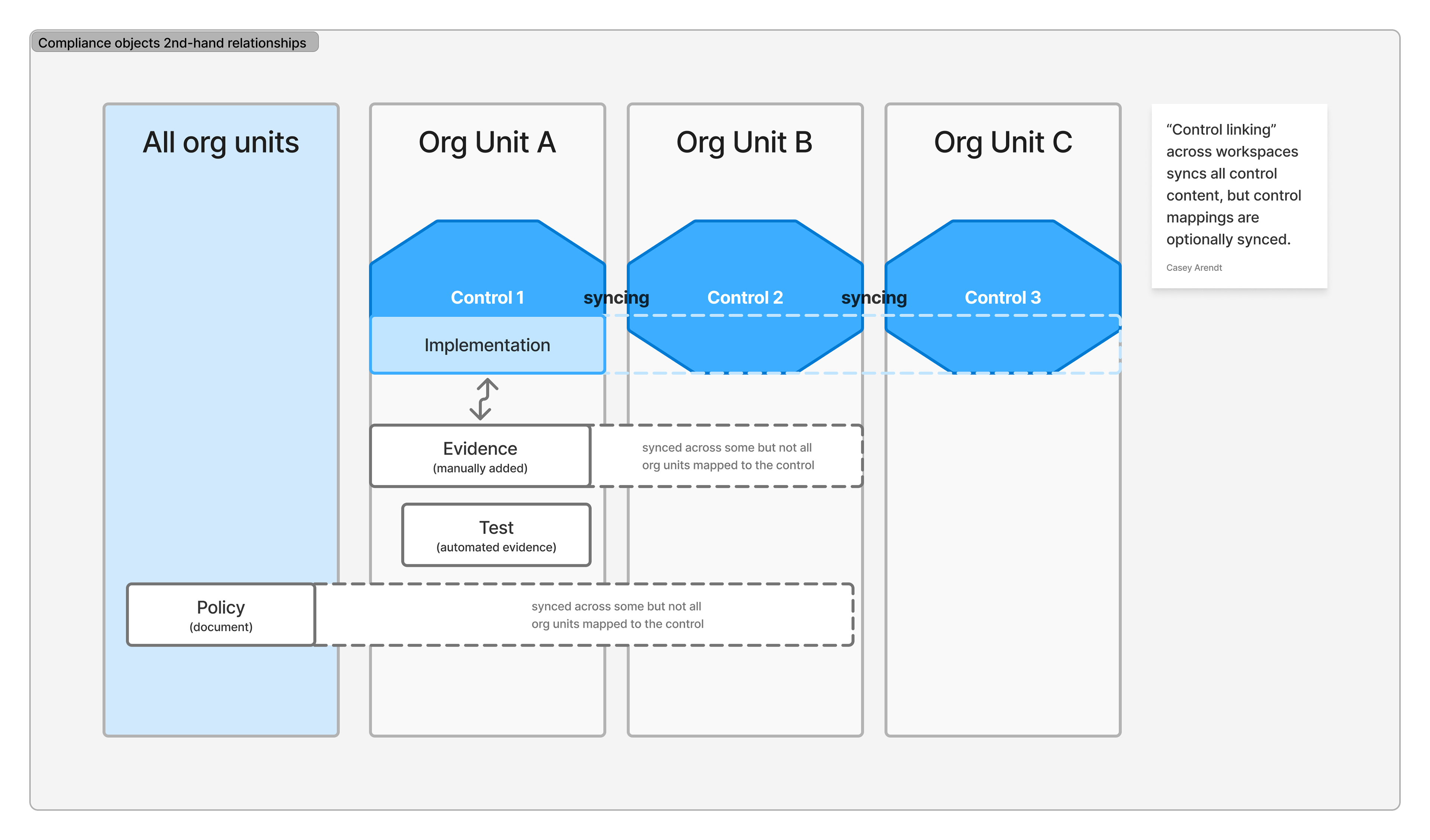
Hierarchy working at the top level doesn't stay at the top level. It's a pattern that needs to propagate down through every related object in the system, and the design investment compounds accordingly.
This was a known scope expansion, not a surprise—which is part of why the foundational model had to be right before anything else could build on it.
A separate but dependent feature was already scoped: shared controls across workspaces. The ability to designate a control as shared—defined once in a source workspace, referenced by others without duplication—was explicitly documented as requiring this hierarchy work to be complete first. The controls hierarchy isn't just one feature. It's the prerequisite for the next several.
Signal
This work was deprioritized before shipping. That's worth naming directly—not as a caveat, but as context. The value wasn't lost with the roadmap slot.
The research alone changed how the team understood the problem. Before this project, "control hierarchy" was a feature request. After it, it was a documented system requirement with three distinct functional patterns, a validated data model, a named set of enterprise customers who needed it, and two whose workarounds were actively costing them. That foundation doesn't disappear when a project gets deprioritized—it's what the next attempt builds from.
The customer signal was specific enough to be credible long after the work paused.
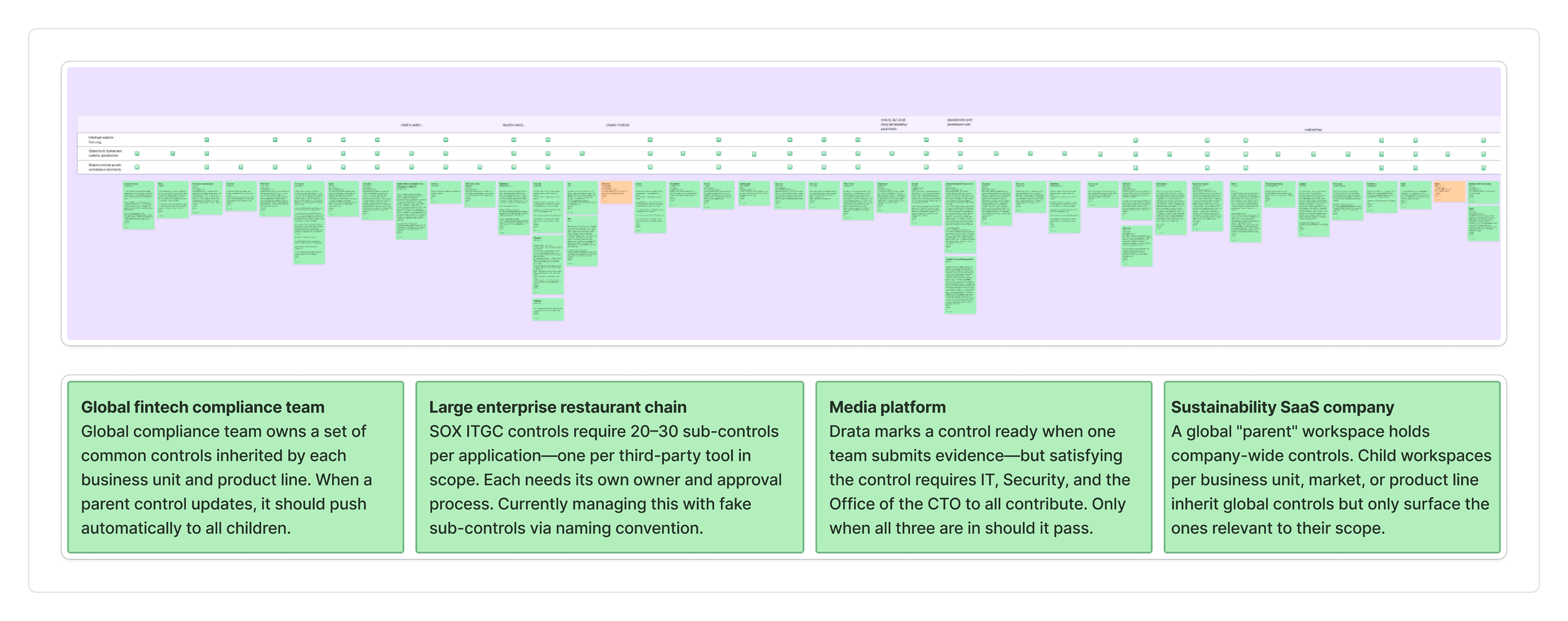
A global fintech compliance team ran compliance across multiple business units, each inheriting controls from a central team. Their ask was precise: when a parent control updates, push it to all children automatically. No manual sync, no drift. The inherited controls pattern, exactly.
A large enterprise restaurant chain was managing SOX ITGC controls with 20 to 30 sub-controls per application, one per third-party tool in scope for their audit. Each needed its own control owner and approval process. They'd built a naming convention workaround—effectively fake sub-controls—just to manage the operational complexity. The parent control wasn't ready until every sub-control was. Their word for the feature: important.
A media platform had a false positive problem. Their compliance platform marked a control as ready the moment one team submitted evidence—even when three teams needed to contribute before the control was actually satisfied. IT, Security, and the Office of the CTO all had to submit. Only when all three were in should the control pass. The product didn't model that. Hierarchy would.
A sustainability SaaS company described it clearly: a global parent workspace for company-wide controls, child workspaces per business unit, market, or product line. Global controls inform everyone. Local controls only surface for the teams that own them. Compliance simplified for non-infosec teams without losing visibility for the people managing the program.
Two deals told the business story without needing names. One prospect left for a competitor because Drata couldn't support global controls across multiple workspaces—a direct loss, traceable to this missing feature. Another was a six-figure opportunity where the same gap was flagged as a dealbreaker.
The work wasn't finished. But it was right.